
The 30 minute web app
Here is an example application that a teacher could make in the first training session, and use thereafter. It gets the children's names and photos (or avatar) from a Google Sheet, as well as a secret list of children that cannot be in the same groups and either puts children into random groups, or picks one student - icecream stick style. Try it out!
A complete assessment and reporting system built by one teacher
This teacher-made example combines Google Apps Script, Google Sheets, and AI-generated summaries to build a bespoke formative assessment system for Primary Computing. It was built within a school context, by a teacher, to solve a real problem.
What this system does
- Children complete a bespoke self-assessment form at the end of each topic
- Teachers quickly add notes on the fly during lessons
- A Google Sheet stores everything
- A summary app combines all the data to give a visual overview
- AI is used to read all data for selected students and generate a progress overview
Teacher summary: all assessment data at a glance
A quick visual overview of class progress, with AI-powered individual reports available on demand.
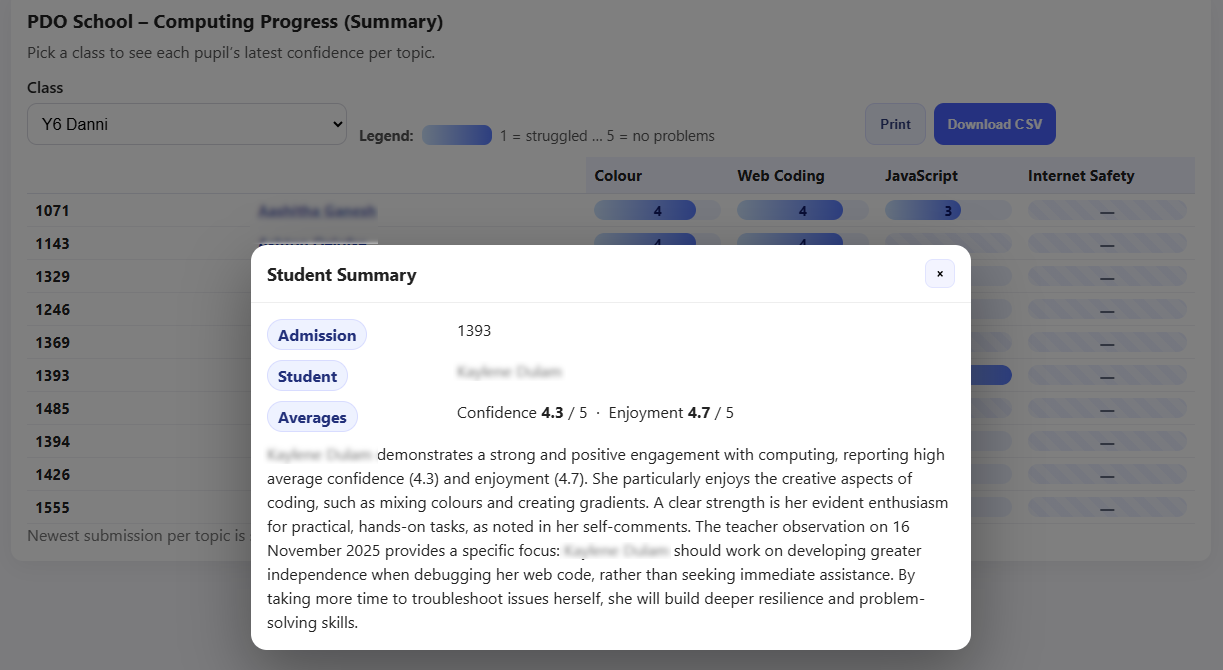
At a glance the teacher can see confidence levels across every topic taught, for every child in the class. The colour coding makes gaps and strengths immediately visible.
AI-powered summaries are available for each child, drawing on both child self-assessment and teacher observations. The AI interprets the combined evidence rather than just repeating it.
Student self-assessment form
Children complete this at the end of each topic. Built with Apps Script rather than Google Forms for precise control over the experience.
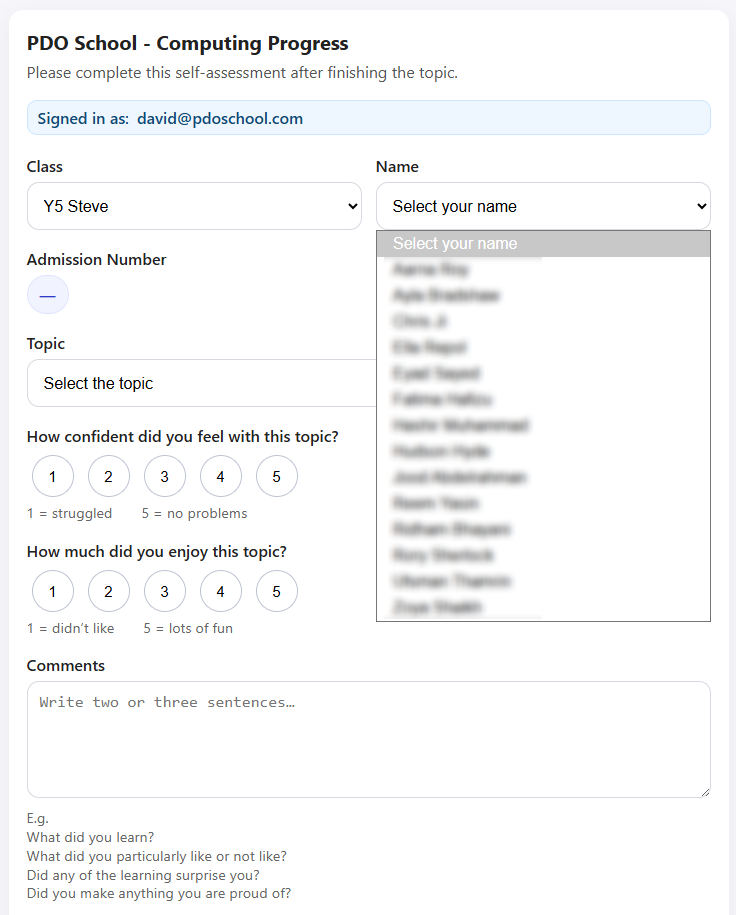
Children select their class first, which populates the name dropdown automatically. This isn't possible with standard Google Forms, but it means every entry is matched to an exact student record, with no typos or mismatches.
Names come from the Google Sheet alongside a unique student number, allowing results to be joined with any other school data.
Apps Script also gives full control over appearance - important when young children are completing the form independently without errors.
Teacher assessment form
Teachers add lesson observations quickly on an iPad during class with no formal structure needed.
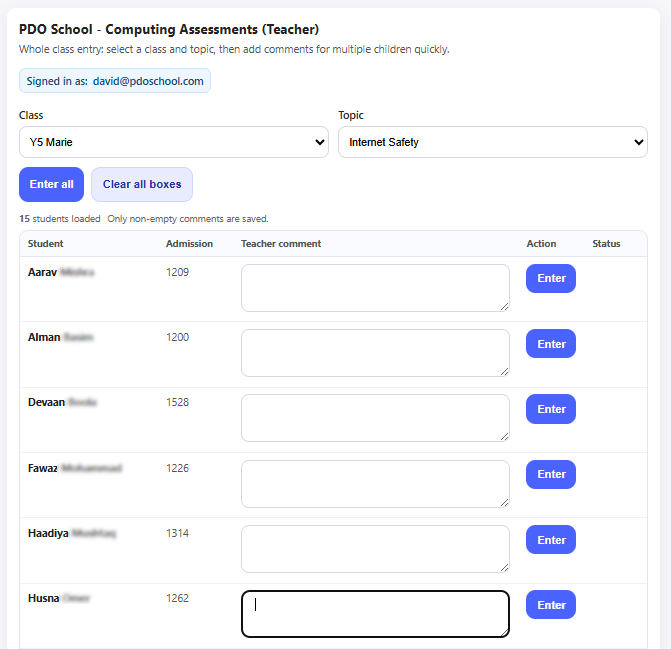
The form is designed for speed. There's no need for formal language or structured notes as the AI reads the teacher's natural observations and turns them into coherent summaries.
Access is controlled through Google login, so only teachers can submit observations. Additional access control can be added via Drive sharing settings.
Storing the data
Everything lives in one Google Sheet: class lists, self-assessment results, and teacher observations, in separate tabs.
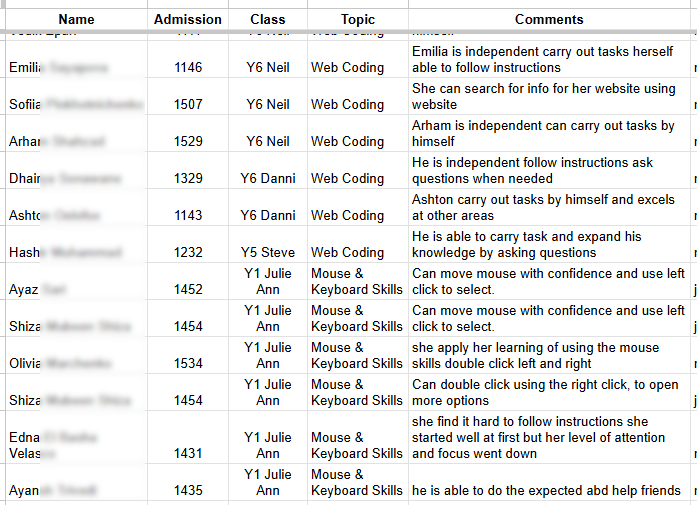
The first tab holds the class list: names, gender, and the unique student reference number from the school database. This number is what links assessment data to every other record.
The second tab records self-assessment results which is read by the summary app to generate class overviews and individual reports.
The third tab holds teacher observations which are combined with self-assessment data to give the AI a complete picture of each child's progress.
The database app and micro-solutions work as one system
The assessment example above gets its class lists from a Google Sheet. With the student database app, that Sheet can be generated in seconds, the right students, the right fields, ready to power the app. You can test the data export app which extracts information from Google Sheets here.
Data export
The database app exports exactly the right students with exactly the right fields, including unique student IDs that link everything together.
Forms write back
Student-facing and teacher-facing Apps Script forms write directly to the Sheet. Student IDs ensure every entry is matched precisely.
AI interprets
The summary app reads all the data and calls an AI API to generate reports, with names removed before they leave the school's systems and added back after.
stage 2: shared framework
See stage 2: shared framework →Explore how a shared tools will bring all teacher made applications into a unified framework.