
Six pieces that work as one system
Each component solves a specific problem. Together they form an infrastructure that any teacher-built app can plug into — rather than each app having to solve these problems individually.
Student database app
Test NowSchool student data made highly accessible to any user. Searchable, filterable, and exportable to a formatted Google Sheet in seconds.
- full student and parent records
- groups, classes, medical notes
- custom export with live preview
- edit data with permission controls
Shared CSS stylesheet
A common stylesheet that every staff-built app references. Apps look coherent and professional from day one, without each teacher having to design from scratch.
- school colours and typography
- consistent component styles
- update once, applies everywhere
- optional dark or light theme
School API key management
AI service keys managed centrally by the school. Staff build apps that call AI without needing personal accounts, without spending their own money, and without the school losing visibility of what is being called and at what cost.
- no individual staff accounts needed
- cost visible and controlled centrally
- keys never exposed in user-facing code
Common log files
Every AI interaction across every app writes to a shared Google Sheet log. The school always knows what AI is being used, by which app, when, and by whom.
- timestamp, app, user, prompt summary
- reviewable by leadership at any time
- students know all use is recorded
Log analysis app
A dashboard that reads the shared log and surfaces patterns: which apps are being used most, by which classes, at what times, and with what kinds of prompts.
- usage summaries for leadership
- per-app and per-student breakdowns
- scan for acceptable use and unusual activity
- flags unusual activity automatically
- regular summary reports emailed
App builder and prompt creator
A tool that generates the scaffolding for a new school app automatically: wiring in data access, logging, anonymisation, and guardrails so the teacher only needs to focus on what their app actually does.
- generates Code.gs, User.gs, and Index.html
- all shared infrastructure pre-wired
- teacher fills in the app-specific logic
School data as a foundation every app can build on
When student data lives in a central Google Sheet that every app can read from, building a new app stops requiring any work to get the data in. The structure is already there - students, classes, groups, medical notes, parent contacts - and any app a teacher builds can simply ask for exactly the students it needs.
That changes what a teacher has to describe when they start building. Instead of solving the data problem themselves, they describe what the app should do. The data layer is already handled.
This is what makes a collection of individual apps start to feel like a system. Each one can draw from the same source, export the right students in the right format, and return anything it creates - results, records, reports - back to the same place.
Because the data structure is known and documented, an AI assistant can generate the complete app from a description like this.
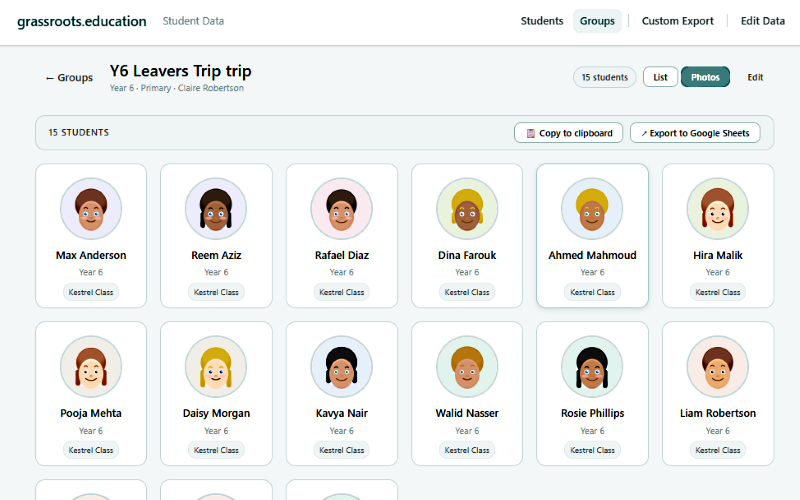
Browse the full student body instantly. Filter by year group, class, or group membership. Find any student in seconds.
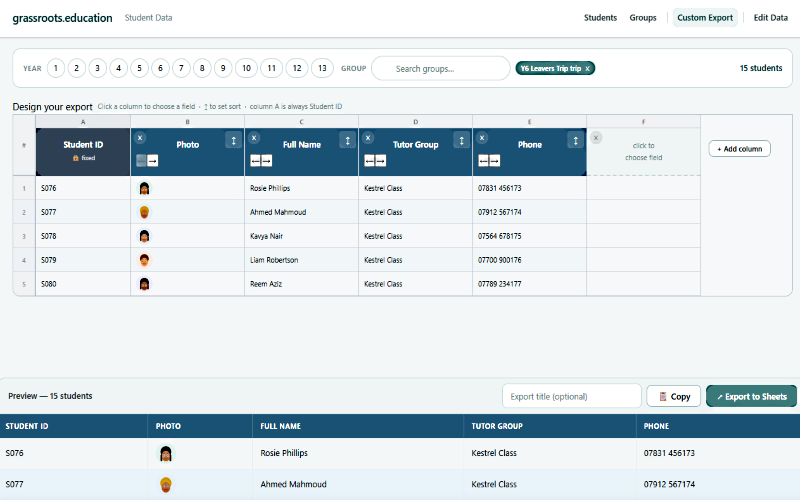
Choose exactly which fields and which students. Preview the result before exporting. The Sheet lands in the school Drive and is immediately usable by any app.
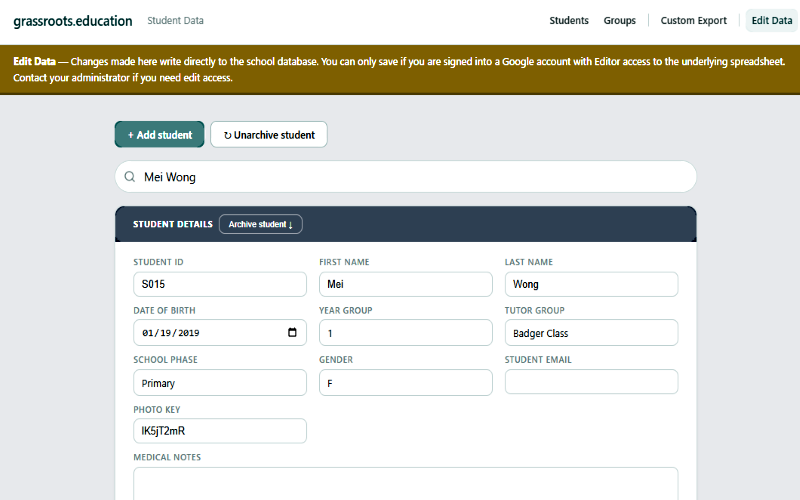
Authorised staff can update student records directly in the app, with Google account permission controls. No one touches the raw Sheet.
Try the live demo
Realistic data, no login required. Browse students, design an export, generate a Google Sheet, exactly as your staff would use it.
What the app contains
- full student records including MIS ID
- parent and carer contacts
- classes, groups, and group memberships
- medical notes and general notes
- photo library (hosted in school Drive)
- edit data with Google account permission controls
Custom export designer
- choose any combination of fields as columns
- filter by year group, class, or group membership
- age range filter, per-field value filters
- up to three sort priorities
- live preview before export
- exports land in a shared school folder
Ready-built applications designed for your major uses
While working to develop your staff's ability to create their own applications, I will also be able to assist with making fundamental admin applications.
Parent meetings booking
A bespoke booking app matched to your school's schedule and structure, that works simply and reliably with bookings recorded on a Google Sheet.
- teacher availability is added to on simple Sheet
- parents book slots via a professional looking school-branded interface designed for mobile view
- teacher can view and edit bookings either on the Sheet or in a teacher view of the app
- the bookings are opened and closed by simply changing one word in the Sheet
- no third-party account or subscription required
- the application and Sheet are completely reusable
Accident report form
A structured form that creates a formatted Google Doc permanent record automatically, files it in the correct Drive folder, and notifies relevant staff immediately by email, and can be edited with follow up information
- consistent, complete records every time
- doc created and filed automatically on submission
- staff notified instantly by email
- records searchable and auditable from Drive
- every accident permanently evidenced and shared
School trip planner
An app that automates the paperwork for planning a trip, pulling all the appropriate source information. It generates a trip planning document from a simple form, including a standard risk assessment template, relevant student information, and automatic sharing with the staff involved.
- trip doc generated from a short form
- standard risk assessment included automatically
- all trip specific information added
- relevant student data pulled from the database
- shared with relevant staff on creation
- all trips planned thoroughly and evidenced
Backup management
A scheduled Apps Script application that copies key Sheets and Docs to a designated backup folder automatically, with a simple dashboard showing what was backed up and when.
- runs automatically on a schedule
- covers key school data Sheets and Docs
- backup log visible to admin at any time
- restoring from backup takes seconds
These are examples are all apps I have created for a school before and are proven to work extremely effectively. But there is no limit to what can be made. The further down the path you go, the more of your processes you realise can be effectively managed and automated with Google Workspace.
Every new app starts with the framework already in place
One of the challenges of Stage 1 is that every teacher builds their own app from scratch, including all the plumbing for data access, logging, and safety. The app builder removes that duplication entirely.
Code.gs — fixed code for all apps
The server-side script is the core of all apps, containing all the shared infrastructure: links to the data spreadsheet, the logging sheet, the API key store, and common utility functions that every app is likely to need.
Teachers do not edit this file. That means the school's data connections and safety measures are always intact, regardless of what the teacher builds on top.
User.gs — the teacher's file
The teacher's own logic lives here. This is where the app's specific behaviour is written: what it reads, what it processes, what it returns. It calls the shared functions from Code.gs rather than duplicating them.
The app generates a starting scaffold and a prompt that describes exactly what to add guides the teacher through each stage.
Index.html — the user interface
The front end is generated as a starting point, referencing the school's shared CSS automatically. The builder also generates a prompt that describes what the interface needs to do, which the teacher can use with an AI assistant to complete the design.
The result is an app that looks like it belongs to the school from the moment it's first opened.
Built in from the start, not added later
The safety measures in the shared framework aren't policies bolted on after the fact. They are structural, wired into every app that uses the framework, automatically, whether the teacher thinks about them or not.
What the framework provides by default
Intereseted in learning more?
See about grassroots education →About grassroots education.